
 Blog
BlogWhy is QuickBooks Getting So Expensive? Everything Small Business Owners Need to Know
Published on:
A complete 2026 breakdown of QuickBooks pricing, Desktop changes, and what to do before your next renewal.
You opened your email, saw the renewal notice from Intuit, and did a double take. The number was higher than last year. Again.
If that feeling is familiar, you are not alone. Across Reddit threads, QuickBooks community forums, and small business Facebook groups across the U.S., the same frustration shows up every single month. Business owners blindsided by price increases on a product they have relied on for years, with no clear explanation of what actually changed to justify it.
So before your next autopay hits, this blog breaks down exactly what you are paying for, how much prices have climbed over the past five years, what is really happening with QuickBooks Desktop, and whether you are getting a fair deal.
QuickBooks Online vs. QuickBooks Desktop: What Is the Actual Difference?
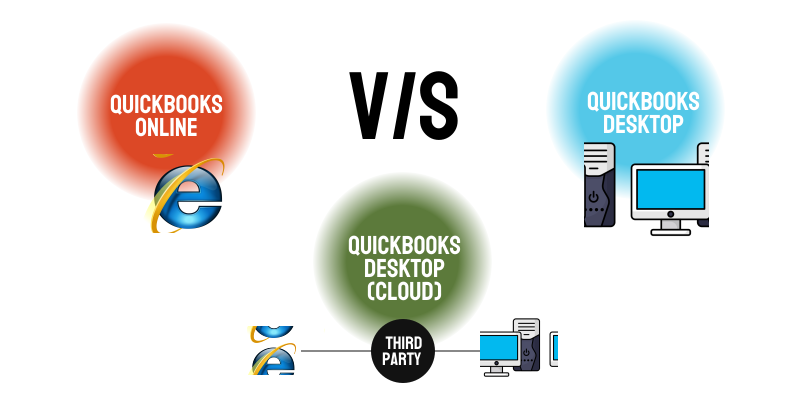
When people say "QuickBooks in the cloud," they could mean two very different things. Understanding the distinction could save you from making a costly mistake.
Option 1: QuickBooks Online- The Browser-Based Version
Think of this like Gmail for your accounting. You log in through any web browser. No download, no installation. Your data lives on Intuit's servers, updates happen automatically, and you pay a monthly subscription while Intuit handles everything behind the scenes.
This is the product Intuit is actively pushing. All new U.S. customers are directed here first.
Option 2: QuickBooks Desktop- The Traditional Software
This is the original Windows-based QuickBooks that millions of American businesses have used for years. It runs on your computer or office server, your data stays on your own machine, and it has deeper features than Online. It is also what most small business accountants and bookkeepers were trained on.
Intuit stopped selling the standard Desktop versions (Pro Plus and Premier Plus) to new U.S. customers after September 2024. The only Desktop product still available for new customers to purchase is QuickBooks Enterprise, which starts at around $2,210 per year for a single user.
Option 3: QuickBooks Desktop Hosted in the Cloud
This is where the confusion often starts. Hosted Desktop is not a product Intuit sells. It is a service offered by third-party companies where they take your existing QuickBooks Desktop software and run it on a secure remote server, so your team can access it from anywhere, the same way they would use QuickBooks Online.
The software is identical to Desktop and every feature stays the same. What changes is where it runs, on a remote server rather than your office machine. You connect over a secure internet session, and everything looks and works exactly as it always has.
The clearest way to think about it: QuickBooks Online is a completely different product. Hosted Desktop is the same software you already know, just running somewhere else. One changes your tools entirely. The other changes only the location.
QuickBooks Pricing History: How Much Have Prices Actually Gone Up?
The price increases over the past five years have been significant. Here is the full picture, backed by published data:
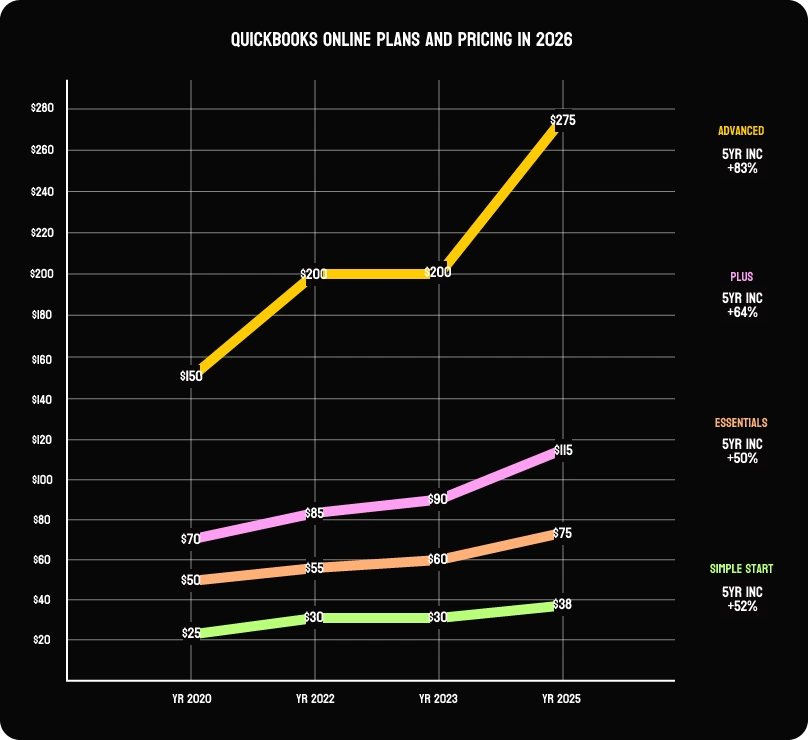
The numbers are hard to ignore. The Plus plan alone climbed 64 percent over five years. The Advanced plan jumped 83 percent over the same period. According to NerdWallet, annual increases since 2023 have averaged:
• Simple Start: +12.7% per year
• Essentials: +11.9% per year
• Plus: +13.1% per year
• Advanced: +17.3% per year
General U.S. inflation over the same period averaged around 2 to 3 percent annually. Intuit has been raising prices at roughly three to four times the inflation rate.
Intuit's explanation for the 2025 price increases was investment in AI features and product innovation. That same quarter, Intuit reported a 20 percent increase in operating income. Whether the product improvements justify what you are now paying is a question worth sitting with before your next renewal. (Source: The Woodard Report)
QuickBooks Online Plans and Pricing in 2026
Here is exactly what you will pay today if you are buying or renewing a QuickBooks Online subscription in the U.S.:
| Plan | Monthly Price | Users | Best For |
|---|---|---|---|
| Simple Start | $38/mo | 1 | Freelancers, solo entrepreneurs, basic invoicing & expenses |
| Essentials | $75/mo | 3 | Small teams, bill management, time tracking, multiple currencies |
| Plus | $115/mo | 5 | Growing businesses needing inventory tracking & project management |
| Advanced | $275/mo | 25 | Larger businesses needing custom reporting, automation & priority support |
Is QuickBooks Desktop Really Being Discontinued? Here Is the Honest Answer
There have been a lot of alarming headlines about this, and some of the concern is justified. But the reality is more specific than most articles suggest. Here is exactly what happened.
What Intuit stopped selling (September 30, 2024)
Intuit stopped selling new subscriptions for QuickBooks Desktop Pro Plus, Premier Plus, and Mac Plus to U.S. customers. If you already have one of these subscriptions, you can continue renewing it, you are not being cut off. If you are a new customer looking to buy, those products are simply no longer available.
The one Desktop product Intuit still actively sells to both new and existing customers is QuickBooks Enterprise, which starts at approximately $2,210 per year for a single user.
The rolling 3-year support policy
Intuit retires Desktop versions after roughly three years. Once a version passes that window, you lose payroll processing, live bank feeds, merchant services, and official support. The software may still open on your computer, but it runs without updates, without security patches, and without any connected services.
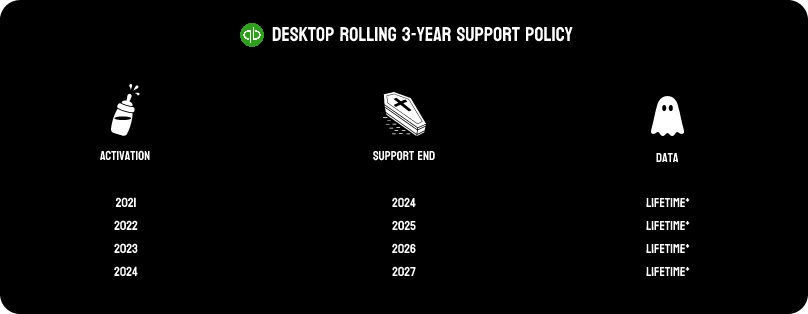
• QuickBooks Desktop 2021 — Support ended May 31, 2024
• QuickBooks Desktop 2022 — Support ended May 31, 2025
• QuickBooks Desktop 2023 — Support ends May 31, 2026
• QuickBooks Desktop 2024 — Support ends approximately May 2027 (the last version ever sold to new customers)
What Can QuickBooks Desktop Do That QuickBooks Online Cannot?
This is the most important question for any business considering a switch, and the answer depends greatly on what your business actually does day to day.
• Advanced inventory management: Multi-location tracking, serialized inventory, barcode scanning, and bin and lot tracking are available in Desktop Enterprise but absent or very limited in QuickBooks Online. The Plus plan offers basic inventory, but it does not match Desktop depth for manufacturers, wholesalers, or retailers with complex stock requirements.
• Job costing: Desktop and Enterprise let you track every dollar on a project like labor, materials, overhead with precision. QuickBooks Online's job costing is more generalized and often insufficient for construction, contracting, or professional services businesses that need exact project-level profitability figures.
• Industry-specific editions: Desktop Enterprise has dedicated versions for construction, manufacturing, wholesale distribution, retail, and nonprofits with specialized reports and workflows built in. QuickBooks Online has no industry-specific editions.
• Advanced reporting: Desktop and Enterprise offer more than 200 built-in report templates including industry-specific ones. QuickBooks Online's reporting is solid but narrower in scope.
• Large company file performance: Businesses with high transaction volumes, multiple entities, or years of history typically run faster and more reliably on Desktop than on QuickBooks Online, which can slow down with large datasets.
• Class and location tracking: QuickBooks Online Plus caps you at 40 combined tracked classes and locations. Desktop Enterprise has no such cap.
If your business is in construction, manufacturing, wholesale distribution, or any field where detailed job costing, advanced inventory, or industry-specific reporting matters you are likely to find real limitations in QuickBooks Online that Desktop does not have.
What Should You Actually Do Before Your Next Renewal?
If your QuickBooks Online renewal is coming up: Log in and review which features, you are genuinely using. Many small businesses are paying for Plus or Advanced when Essentials covers everything they need. Downgrading could save $40 to $160 per month with no impact on day-to-day work.
If you are on an older Desktop version: Check your version number right now. If you are running 2022 or earlier, you have already passed the support window as of May 31, 2025. That means no security updates, no payroll tax table updates, and no bank feeds. Do not wait for something to break during a busy period review your options while you still have time to plan.
If you are deciding between Online and Hosted Desktop: Run the real numbers. Add up what you currently pay for QuickBooks subscriptions, local IT support, server maintenance, and backup services. Then compare that total against what cloud-hosted Desktop would cost. The gap is often smaller than expected and hosting typically includes security controls, automated backups, and uptime guarantees that your current setup likely does not have.
If your team uses multiple platforms across clients or entities: A hybrid approach is common and entirely workable. Some businesses run QuickBooks Online for simpler clients and Desktop for those with more complex needs. The key is making that choice deliberately rather than letting Intuit's marketing pressure make it for you.
The Bottom Line
QuickBooks prices have risen 50 to 83 percent over five years depending on your plan. Annual increases are running at three to four times the general rate of U.S. inflation. Desktop is not being turned off overnight, but no new standard subscriptions are being sold, older versions are losing services on a rolling basis, and costs keep climbing.
The cloud does offer real advantages, access from anywhere, automatic backups, better security infrastructure, and no hardware to maintain. But those advantages only matter if the product does what your business actually needs it to do.
So, before that next autopay clears, spend 20 minutes. Review your plan. Check what you actually use. Look at the alternatives. And if you are not sure what the right call is, talk to an accounting professional who can give you a straight answer without a product agenda behind it.
Your accounting software should be working for your business. Not the other way around.

Shekhar Mehrotra
Founder and Chief Executive Officer
Shekhar Mehrotra, a Chartered Accountant with over 12 years of experience, has been a leader in finance, tax, and accounting. He has advised clients across sectors like infrastructure, IT, and pharmaceuticals, providing expertise in management, direct and indirect taxes, audits, and compliance. As a 360-degree virtual CFO, Shekhar has streamlined accounting processes and managed cash flow to ensure businesses remain tax and regulatory compliant.