
 Blog
BlogWIP Reports: Your Construction Project's Financial GPS
Published on:
Picture this: You're driving cross-country with no GPS, no map, and no idea how much gas you have left. Sounds like a disaster waiting to happen, right? Well, that's exactly what running a construction project without a WIP report feels like.
Here's the thing I've talked to hundreds of contractors across the US, and you know what I keep hearing? "I thought we were making money on that job." Notice the past tense? Yeah, that's the problem. By the time they realized they were bleeding cash, it was too late to course-correct.
Let me tell you about Work in Progress reports, or as I like to call them, your project's financial GPS. These aren't just boring accounting documents gathering dust in your office. They're your early warning system, your profit protector, and honestly, they might be the difference between thriving and just surviving in this crazy competitive construction market.
What is a WIP Report?
Think of a WIP report like the dashboard in your truck. Your speedometer tells you how fast you’re moving, your fuel gauge shows how much gas you have left, and your odometer tells you how far you’ve come.
A Work in Progress (WIP) report does the same thing for your construction projects. It shows you where the job actually stands financially not what you’ve billed, not what you think is happening, but what’s really going on based on work completed.
At its core, a WIP report answers three simple but critical questions:
• What you’ve spent so far (labor, materials, equipment, overhead—the whole nine yards)
• What revenue you’ve actually earned based on progress, not invoices
• What profit you’re truly on track for (or the losses quietly building)
Sounds simple. It rarely is.
Accurately tracking earned revenue and true job profit is where many contractors get tripped up, which is why WIP reports work best when supported by outsourced construction accounting services that understand job costing and percentage-of-completion accounting.
Done right, a WIP report isn’t just another accounting report it’s your early warning system and your financial GPS for keeping projects profitable.
“In construction, there are bills to pay, materials to order, teams to manage, and everything else in between. That's why you need accurate, real-time Work in Progress reports to keep projects running smoothly and to grow your bottom-line profit.”
— Rob Mercado, CPA, CCIFP, Managing Director at CBIZ
The Scary Truth: Most Contractors are Flying Blind
Want to hear something that'll make you spit out your morning coffee? According to the 2024 State of Residential Construction Industry Report, only 7.6% of builders accurately understand their WIP reports.
And here's the kicker: construction companies have one of the highest failure rates of any industry. According to the U.S. Bureau of Labor Statistics, only about 36% of construction companies founded in 2011 were still operating by 2022. That means nearly two-thirds didn't make it past their tenth birthday. Poor cash flow management? That's one of the biggest culprits.
What's Actually in a WIP Report?
Okay, let's break down what you'll find in a solid WIP report.
| Component | What It Means | Why You Care |
|---|---|---|
| Contract Amount | The total price you agreed to build for |
This is your revenue ceiling, what you're working toward |
| Costs to Date | Everything you've spent so far |
Shows if you're spending faster than planned |
| Estimated Total Costs | What you think the whole job will cost |
Helps predict if you'll finish under or over budget |
| Percentage Complete | How much of the work is actually done |
The key to knowing if you're on track |
| Earned Revenue | Revenue you've earned based on work completed |
More accurate than just looking at what you've billed |
| Billings to Date | How much you've actually invoiced |
Helps manage cash flow and spot billing issues |
| Over/Under Billing | The difference between earned revenue and billings |
Shows who's financing the project, you or the client |
| Estimated Profit | What you expect to make when all is said and done |
The bottom line, literally |
The "Percentage Complete" Puzzle: Three Ways to Crack It
Here's where things get interesting. Figuring out how complete your project is isn't always straightforward. You've got three main methods, and each has its place:
1. The Cost-to-Cost Method
You planned to spend $500 on gas for your trip. You've already spent $250. Simple math says you're 50% done with your journey, right? That's the cost-to-cost method if you've spent half your estimated costs, you're halfway there.
Formula: (Costs Incurred ÷ Total Estimated Costs) × 100
If your project was estimated at $500,000 and you've spent $300,000, you're 60% complete. Easy peasy.
2. The Physical Progress Method
This one's more hands-on. You're literally measuring what's been built. Foundation poured? Check. Framing done? Check. Roof on? Check. You're looking at actual square footage, floors completed, or milestones reached.
3. The Milestone Method
This is the "all or nothing" approach. You hit a major milestone say, completing the foundation and boom, you recognize that chunk of revenue. It's straightforward but can create lumpy financial reporting.
Sample Project Progress: Budget vs. Actual
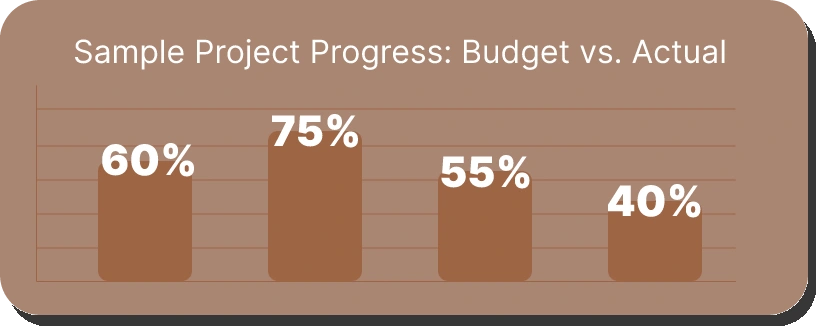
Red flag alert: This project is 60% complete but has burned through 75% of the budget profit is fading fast!
Overbilling vs. Underbilling
Alright, this is crucial stuff. Let me explain overbilling and underbilling in a way that'll stick.
Overbilling (Billings in Excess of Costs)
This is the good kind of imbalance. You've billed your client for more than the work you've completed. Your client's money is sitting in your account, helping you pay for materials and labor. This is healthy cash flow management.
Example: You've completed $200,000 worth of work but billed $250,000. That extra $50,000 is your cushion.
Underbilling (Costs in Excess of Billings)
This is the danger zone. You've done $300,000 worth of work but only billed $200,000. Guess who's financing that $100,000 gap? Yep, you are. You're essentially giving your client a free loan while your own cash reserves drain.
The Cash Flow Impact
| Scenario | Work Completed |
Amount Billed |
Cash Position |
Impact |
|---|---|---|---|---|
| Healthy Overbilling |
$200,000 | $250,000 | +$50,000 | Client financing your project |
| Balanced | $200,000 | $200,000 | $0 | Neutral position |
| Dangerous Underbilling |
$300,000 | $200,000 | -$100,000 | YOU'RE financing the project |
The Silent Profit Killer: Understanding "Fade" and "Gain"
Ever started a project thinking you would make 20% profit, only to end up with 5%? Or worse, a loss? That's profit fade, and it's as common as weather delays on a construction site.
Think of your estimated profit as an ice cube on a hot summer day. Profit fade is like watching that ice cube slowly melt away. Maybe it's unexpected material price increases (the sun got hotter), maybe it's labor running over hours (the day got longer), or maybe it's change orders you didn't price correctly (someone turned up the heat). By the time you're done, your nice big ice cube might just be a puddle.
Profit Fade Happens When:
• Material costs jump mid-project (hello, lumber price swings)
• Labor takes longer than estimated
• Change orders eat into your margin
• Hidden conditions pop up (because they always do)
• Rework due to errors or miscommunication
Profit Gain happens when:
• Your crew works more efficiently than planned
• You lock in material prices before increases
• You find cost savings without cutting quality
How Often Should You Run WIP Reports?
Here's my honest recommendation based on project size:
| Project Size | Recommended Frequency |
Why |
|---|---|---|
| Large Projects ($1M+) |
Weekly | Big numbers move fast; you need constant visibility |
| Medium Projects ($250K–$1M) |
Bi-weekly or Monthly |
Enough to catch issues, not so often it's burdensome |
| Small Projects (Under $250K) |
Monthly | Regular check-ins keep you aware without overwhelming |
| All Projects | At major milestones |
Foundation complete? 50% mark? Always check your WIP |
Software: Your Secret Weapon
Can you run WIP reports in Excel? Sure. Can you also dig a foundation with a spoon? Technically, yes. But why would you?
Modern construction accounting software like QuickBooks (with construction-specific add-ons), Sage 300 Construction, Foundation, or Procore can:
• Pull data automatically from your job costing system
• Update in real-time as costs come in
• Calculate percentages complete without manual math
• Flag issues before they become disasters
• Generate reports with a few clicks instead of hours of spreadsheet wrangling
Remember when contractors insisted on using hand saws instead of power saws? "I've always done it this way!" they would say. Then they watched competitors complete jobs twice as fast. Construction accounting software is your power saw. The question isn't whether you can afford it, it's whether you can afford NOT to have it.
Your 5-Step WIP Report Gameplan
Alright, enough theory. Let's get practical. Here's how to actually implement solid WIP reporting:
Step 1: Get Your Data Collection System Tight
Every cost needs to be tracked to the right job. Every single one that means:
• Time cards coded to specific projects
• Material invoices allocated correctly
• Equipment time logged accurately
• Overhead distributed fairly
Step 2: Choose Your Completion Method and Stick to It
Pick cost-to-cost, physical progress, or milestones based on your project type. Then use it consistently. Switching methods mid-project is like changing your GPS halfway through a road trip you'll end up lost.
Step 3: Update Your Estimates Like Your Business Depends on It (Because It Does)
When costs change, update your estimates immediately. When scope changes, update your estimates. When your crew tells you something's taking twice as long as planned, update your estimates.
Step 4: Run the Reports Regularly
Set a schedule and stick to it. First Monday of the month? Last Friday? Doesn't matter, just make it routine. Put it on the calendar like it's a meeting with your biggest client because it kind of is.
Step 5: USE the Information
This is where most contractors fail. They run the report, glance at it, and file it away. Wrong! If your WIP shows a problem:
• Talk to your project manager immediately
• Figure out WHY costs are running over
• Make changes NOW, not next month
• Document everything for future estimating
The Bottom Line
The construction industry is tough enough with all its challenges weather, supply chain issues, labor shortages, rising material costs. Why make it harder by flying blind on the financial side?
“If you can't measure it, you can't manage it.”
— Peter Drucker, Management Consultant and Author
WIP reports give you the measurement tools you need to actually manage your projects profitably. They're your early warning system, your profit protector, and your path to sustainable growth.
Here's what I know for sure: the contractors who make it in this business the ones who don't just survive but actually thrive they all have one thing in common. They know their numbers. They track their projects religiously. They catch problems early. And they use WIP reports to do it.

Shekhar Mehrotra
Founder and Chief Executive Officer
Shekhar Mehrotra, a Chartered Accountant with over 12 years of experience, has been a leader in finance, tax, and accounting. He has advised clients across sectors like infrastructure, IT, and pharmaceuticals, providing expertise in management, direct and indirect taxes, audits, and compliance. As a 360-degree virtual CFO, Shekhar has streamlined accounting processes and managed cash flow to ensure businesses remain tax and regulatory compliant.